

Edit or delete a client
You can update a client’s contact details at any time, or remove a client from your active list when they’re no longer a client.
Edit a client
Section titled “Edit a client”- Click Clients in the left sidebar.
- Click the client’s name to open their profile.
- Click Edit in the top-right.
- Update any fields — name, email, phone, company, tags, address, or tax rate.
- Click Update.
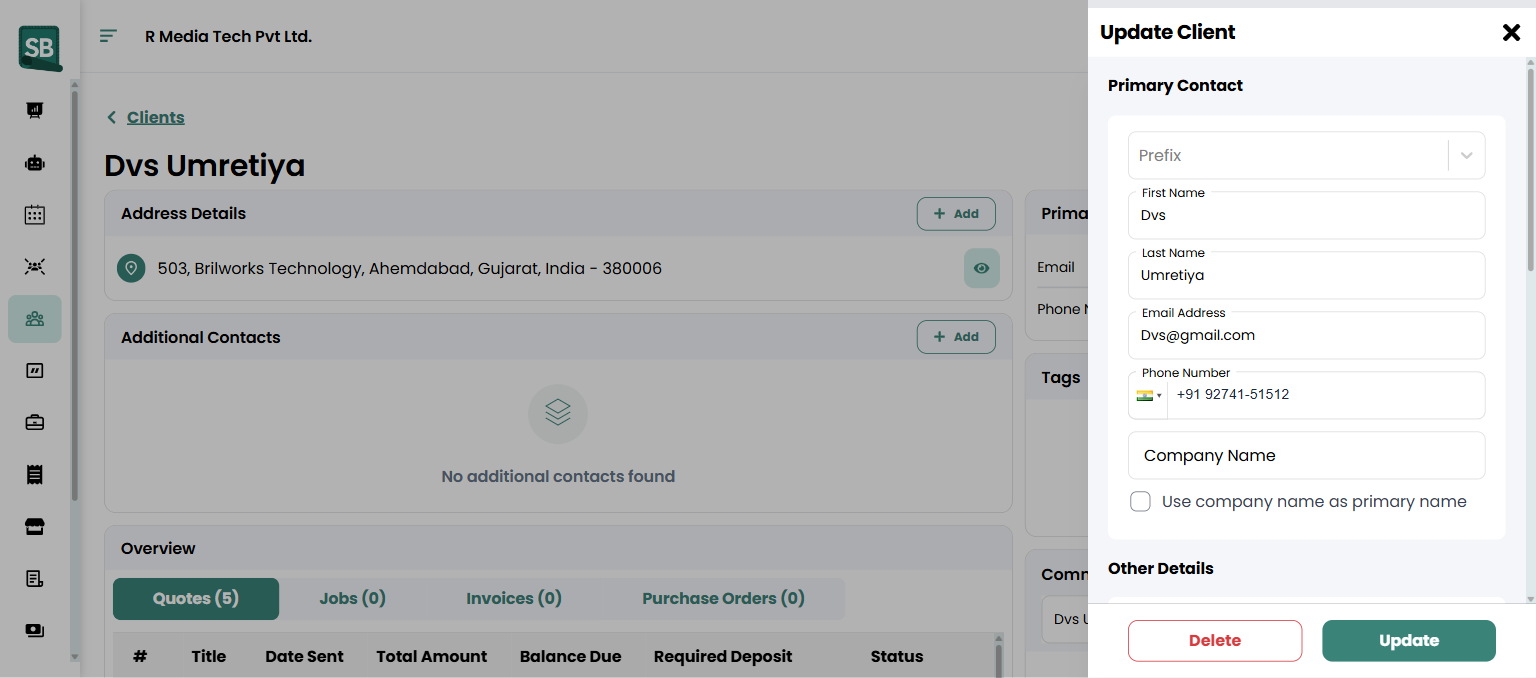
Changes take effect immediately and appear on any new quotes, invoices, or jobs you create. Past records keep the information that was on them at the time they were created.
Delete a client
Section titled “Delete a client”- Open the client’s profile.
- Click Edit in the top right.
- In the Update Client dialog, click Delete.
- Confirm the deletion.
What happens next
Section titled “What happens next”- Edited clients show the updated info everywhere their record is referenced.
- Deleted clients are removed from your Clients list.
- Past invoices, quotes, and jobs for a deleted client still exist in your records for reporting and compliance, but they won’t appear when you search by client.
Should I delete or just mark a client inactive?
For long-time clients you no longer work with, tagging them Inactive is usually safer than deleting — it keeps every quote, invoice, and job in their history exactly where you’d expect it. Reserve deletion for genuine mistakes (a duplicate record, a test entry, a client you created in error).
Will editing a client change old quotes and invoices?
No. Past quotes, invoices, and jobs preserve the information that was on them at the time they were created — the client’s name, address, phone, etc. Editing the client record only affects new documents you create afterward.
What happens to a deleted client’s history?
Past invoices, quotes, and jobs are kept in your records for reporting and compliance. They don’t show up when you search by client (because the client record is gone), but the financial records persist.
I can’t find the Delete option — why?
Deletion is restricted to higher access levels. If you don’t see the Delete option, ask your account admin to handle the deletion for you. See Assign roles and permissions for the full breakdown.
I deleted a client by mistake — can I get them back?
Contact Service Buddy support — deleted records can usually be restored on request. Don’t recreate the client manually in the meantime; if both the original and a manual recreation exist, you’ll end up with duplicates when the original is restored.
Can I merge two duplicate client records?
There’s no in-app merge tool. If you have duplicates, pick the one you want to keep, move any orphan history to it manually if possible (re-link jobs, etc.), then archive or delete the duplicate. For complex merges contact support.
Editing a client changed the tax rate — will it apply retroactively?
No. Tax rate changes flow only to new quotes, invoices, and jobs created after the change. Existing records keep the tax rate they had at the time they were created.