

Add a vendor
A vendor is any supplier you buy from — carpet mills (Shaw, Mohawk, Stanton, Karastan, Tuftex), hardwood and LVP manufacturers (Bruce, Mannington, Coretec, Mohawk Hardwood), tile manufacturers (Daltile, Marazzi, MSI), distributors (Galleher, BPI, NRF), padding and underlayment manufacturers, area rug suppliers, freight companies, and equipment vendors. Adding a vendor saves their contact info so you can drop them onto purchase orders and link them to items in your catalog.
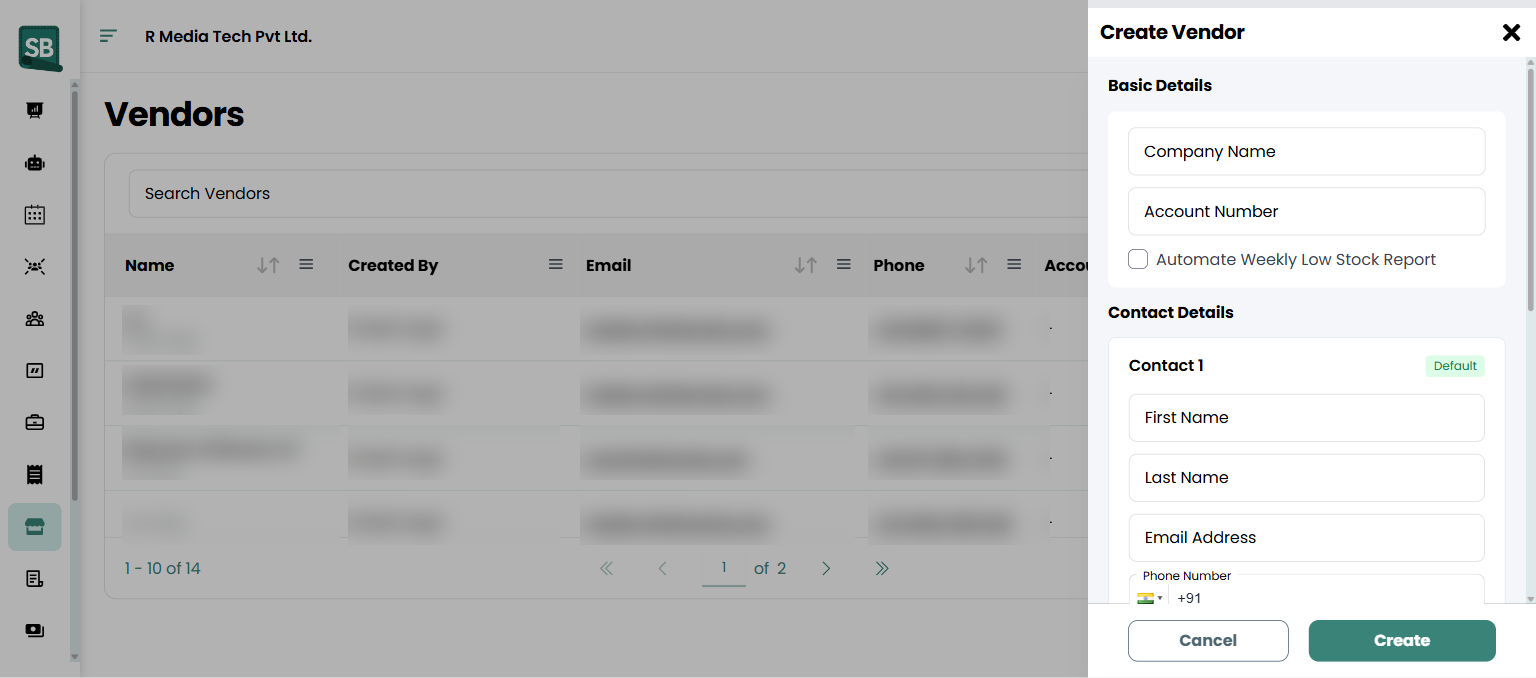
- Click Vendors in the left sidebar, then click + Create in the top right.
- In the Create Vendor drawer, fill in the Basic Details:
- Company Name — the business name.
- Account Number — your account number with this vendor (speeds up PO processing).
- (Optional) Check Automate Weekly Low Stock Report to receive automatic alerts when stock runs low.
- Under Contact Details, fill in the primary contact:
- First Name and Last Name
- Email Address
- Phone Number (with country code)
- Click Create.
What happens next
Section titled “What happens next”- The vendor appears in your Vendors list.
- They become selectable on new purchase orders.
- You can link items in your catalog to this vendor so your team knows who to reorder from.
Link items to a vendor
Section titled “Link items to a vendor”After adding a vendor, go to Products and open any product. Set the Vendor field to the new vendor and save. Now when stock runs low on that item, you know exactly who to call.
Should I add the mill, the distributor, or both?
Whoever you actually place the PO with. If you order direct from the mill or manufacturer (Shaw, Mohawk, Stanton for carpet; Bruce, Mannington, Coretec for hardwood/LVP; Daltile, Marazzi for tile), add them as a vendor. If you go through a distributor (Galleher, BPI, NRF, etc.), add the distributor. Some retailers add both and link items to the right one — useful when you switch sourcing.
What if I have different rep contacts at the same mill?
Use the primary contact for your main account rep and add additional rep details to the Notes field, or list multiple contact rows if Service Buddy supports it. Most retailers keep one vendor record per mill and pick up the phone for the right rep based on the product line.
Do I need to set an account number?
Not required, but recommended. Your mill account number speeds up PO processing on their end and makes sure your pricing tier is honored. Add it once and every PO sent to that vendor includes it automatically.
What does Automate Weekly Low Stock Report do?
When toggled on, Service Buddy emails the vendor a weekly snapshot of items linked to them where on-hand quantity is low. It’s a hands-off way to keep replenishment moving. Skip it if you prefer to control reordering manually.
Can a single item have more than one vendor?
The primary vendor on an item is the one Service Buddy associates for low-stock and PO defaults. Some retailers track secondary suppliers in the Description or Notes so the team knows alternates exist if the primary is out of stock.
How do I handle freight and drop-ship vendors?
Add freight as its own vendor record (e.g., XPO Logistics — LTL). When you create a PO that needs freight, add a line item for the freight cost so it shows up in your purchase records and helps you reconcile invoices later.
Can I delete a vendor I don’t use anymore?
Yes — but if they have past POs, archiving is safer (preserves history). Use Edit → Archive instead of delete to keep the record visible only in historical views.