

Create a quote
A quote in Service Buddy lays out the materials, labor, and total cost a client will pay before any work happens. It’s also called an estimate or digital proposal. This guide walks you through creating one from scratch — for any flooring type: carpet, hardwood, LVP, laminate, tile, vinyl, or area rugs.
Before you start
Section titled “Before you start”Make sure the client already exists in Service Buddy. If not, add them from the Clients tab first. If you’ve already done a measure, you’ll want the room dimensions, stair count, subfloor notes, and any conditions that affect the install (moisture, height transitions, furniture) handy.
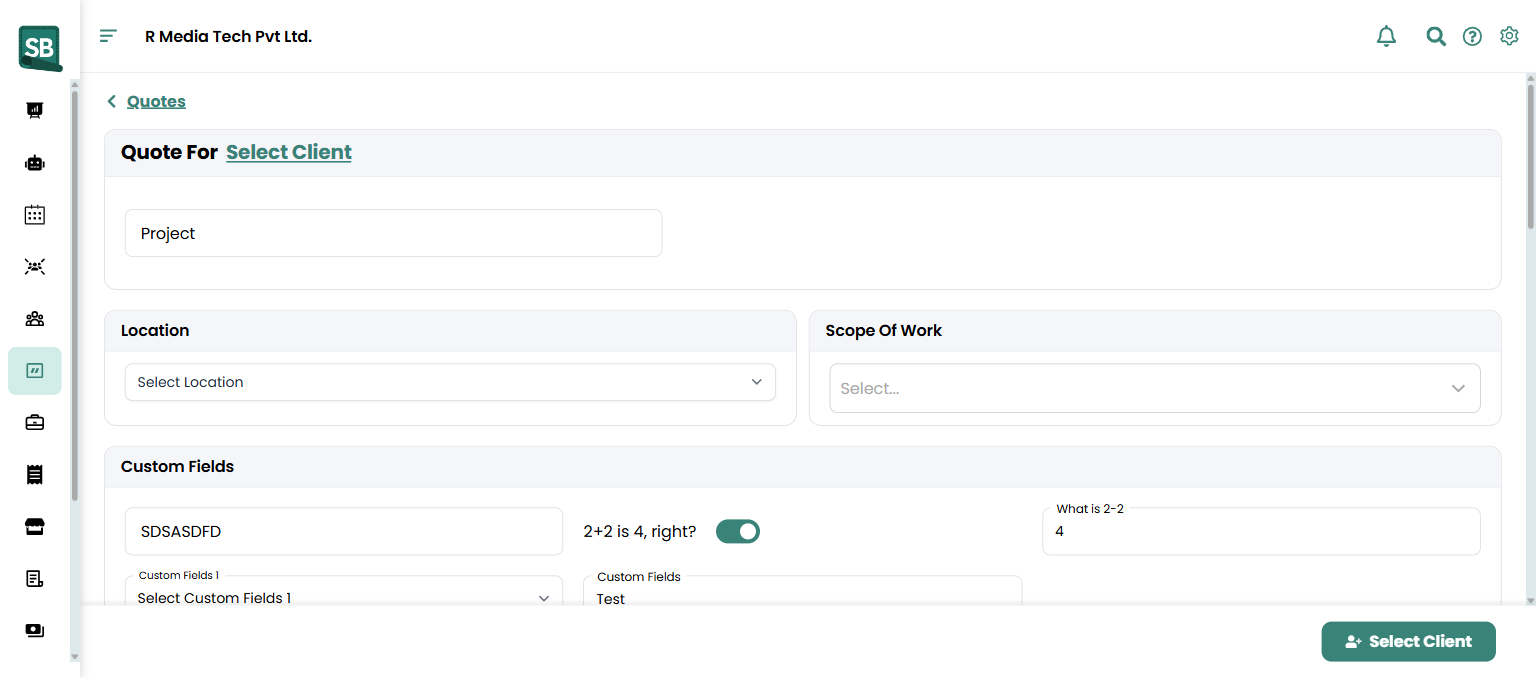
- Click Quotes in the sidebar, then + Create.
- At the top, click Select Client next to Quote For and pick the client from the list.
- Enter a clear Project name so your team and client both know what the job is — for example,
Smith Family — Living Room Hardwood & Stairs,Cohen — Master Bedroom Carpet, orPatel — Whole-Home LVP. - (Optional, multi-store retailers) Pick a Location to tie the quote to a specific showroom or warehouse.
- (Optional) Pick a Scope Of Work template if you’ve saved one. See Create a scope of work template.
- Scroll to the line items and click + Add Line Item for each material or labor charge. For each row, toggle Product / Service and set:
- Name — type a name or pick from your catalog.
- Qty — square yards for broadloom carpet, square feet for hardwood/LVP/laminate/vinyl, cartons or boxes for boxed product, linear feet for trim and binding, count for stairs.
- Unit Cost (your cost) and Unit Price (what the client pays).
- Discount ($ or %) if you’re applying one.
- Exempt From Tax if the line shouldn’t be taxed (your accountant can advise — see Set up tax rates).
- Use + Add optional line item for upgrades the client can choose to include — premium padding, upgraded underlayment, scotch-guarding, soundproofing, an upgraded transition strip, or a longer warranty.
- The totals panel on the right shows Subtotal, Discount, tax (rates and group), and Total Amount — all calculated automatically as you add lines.
- (Optional) Add Tags so you can filter quotes later (
Stairs,Commercial,Repeat Client). - (Optional) In the totals panel, click + Add Required Deposit to require a deposit (flat amount or percentage) before work begins. See Collect deposits on quotes.
- Click Save at the bottom to keep it as a draft, or click Notify Client to send the proposal immediately by email or text.
What to put on a flooring quote
Section titled “What to put on a flooring quote”Most flooring quotes include a mix of these line items. Your quote doesn’t need every category, but most jobs touch several:
| Category | Example line items |
|---|---|
| Material | Carpet by the sq yd, hardwood/LVP/laminate by the sq ft or carton, tile by the box, area rug, stair runner, padding, underlayment, moisture barrier |
| Cuts and waste | Waste allowance (see waste guidance below) |
| Install labor | Install per sq yd or sq ft, stair labor (per stair), binding (per linear foot), seaming, glue-down, floating-floor install, tile labor (per sq ft) |
| Tear-out and disposal | Remove old flooring, haul-away, furniture moving, appliance disconnect/reconnect |
| Site prep | Subfloor repair, moisture testing, self-leveler, transition strips, tack strip replacement, quarter-round / shoe molding |
| Freight | Mill or distributor freight, drop-ship to job site |
Keep these as separate lines on the quote (not bundled into one “flooring install” total). Itemized quotes earn trust and make change orders easier — if the client adds a closet or you find subfloor damage, you adjust one line, not the whole price.
Waste allowance guidance
Section titled “Waste allowance guidance”Always add waste on top of the measured area. Typical ranges:
| Product | Typical waste % | Higher end when… |
|---|---|---|
| Carpet (solid) | 5–10% | Multiple seams, irregular rooms, stairs |
| Carpet (patterned) | 10–20% | Large pattern repeat must align across seams |
| Hardwood | 5–10% | Diagonal layouts, herringbone, mixed-width planks |
| LVP / Laminate | 7–10% | Long planks, complex room shapes |
| Tile | 10–15% | Diagonal layouts, large-format tile, mosaics |
| Stair runner | Add stair count + landing pieces, not a flat % | Pattern goods, double-wide stairs |
Always confirm with your installer — these are starting points, not rules. Build the waste into your material line or list it as its own Waste allowance line.
What happens next
Section titled “What happens next”Your quote is saved with Draft status — only visible to your team. You don’t have to keep clicking Save as you build, either: Service Buddy saves your changes as you go, so a phone call or closed tab won’t lose your work. When you’re ready to send it, open the quote and click Notify Client at the top right to deliver it by email or text. See Send a digital proposal for details.
Can I edit a quote after the client has approved it?
No — pricing on an approved quote is locked. If you need to change anything (added rooms, swapped padding, upgraded underlayment, scope creep on stairs, switched from LVP to hardwood), open the original and use More Actions → Create Similar Quote to draft a revised version, then send it to the client for fresh approval.
How do I add a deposit requirement?
In the totals panel of the quote, click + Add Required Deposit. Enter a flat amount or a percentage of the total. The deposit is collected automatically when the client approves the quote, if BuddyPay is set up. See Collect deposits on quotes.
How do I handle waste and cuts on a flooring quote?
Add a separate Waste allowance line item (or build it into your material line as a markup). Typical ranges: 5–10% for solid carpet, 10–20% for patterned carpet, 5–10% for hardwood, 7–10% for LVP/laminate, 10–15% for tile. Diagonal layouts, herringbone, large-format tile, and pattern goods all push the % up. Keeping it as its own line is clearer for the client than burying it in the material price.
Should install labor be a separate line from materials?
Yes. Itemize material, padding or underlayment, install labor, stair labor, tear-out, and site prep as separate lines. It earns trust on the quote and makes change orders simpler — if you find subfloor damage, a moisture issue, or the client adds a closet, you adjust one line, not the whole price.
Can the client counter-offer or request changes?
The digital proposal lets a client approve, decline, or send a comment back. If they push back on price, you’ll see their note and can respond by editing the draft (if it’s not yet approved) or creating a revised version with Create Similar.
Where does tax come from on a quote?
The tax rate is set on the client property (the install address). When you pick the client and property at the top of the quote form, the property’s tax rate auto-applies to all line items. You can mark individual lines as tax-exempt with the Exempt From Tax checkbox. See Set up tax rates.
Can I save reusable bundles?
Yes — save common configurations as catalog items (e.g. Living room carpet install (sq yd) or Whole-home LVP install (sq ft) with material, padding or underlayment, and labor pre-priced together). When you start a new quote, drop them in with one click instead of retyping each line.