

Add an item to your catalog
Your item catalog is your price book. Everything you sell or use — carpet, hardwood, LVP, laminate, tile, vinyl, area rugs, padding, underlayment, trim, install labor, equipment — lives here. Once added, items drop into quotes, invoices, and purchase orders in one click.
-
Click Settings in the left sidebar, then click Products & Services (under Company Management).
-
Pick the Products or Services tab, then click + Create in the top right.
-
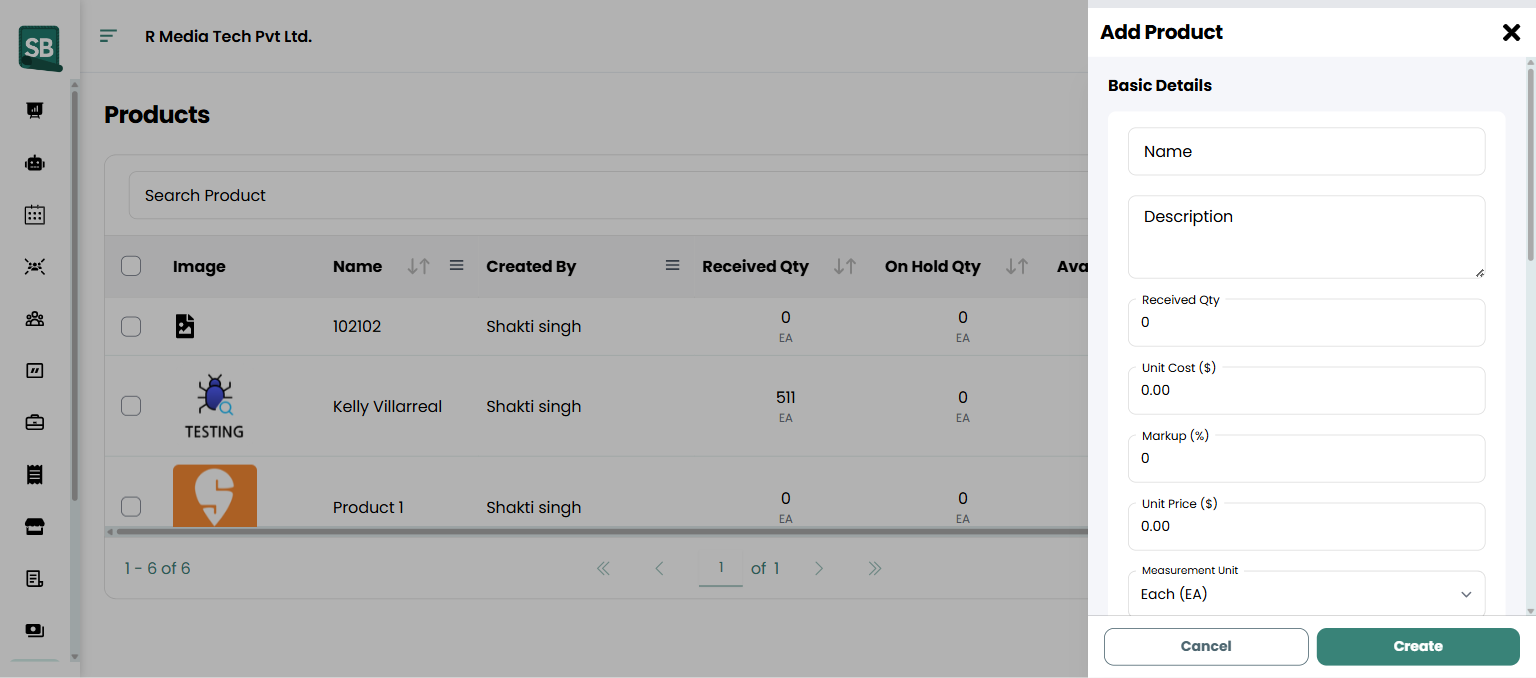
In the Add Product window, fill in Basic Details:
- Product (or Service) — the name. Keep it short and recognizable. Examples:
- Carpet:
Stainmaster PetProtect — Sand Dune 40oz - Hardwood:
Bruce Oak 3/4" 5" Saddle - LVP:
Coretec Pro Plus 7x48 LVP - Tile:
Daltile Continental Slate 12x12 Tuscan Blue - Padding:
Carpet Pad 7lb 8mm
- Carpet:
- Description — appears on quotes and invoices when this item is added.
- Inventory Type — Inventory for anything you hold stock of and want counted, Non-Inventory for things you sell or charge for but never count (special orders, freight, drop-shipped product). Products only.
- Measurement Unit — how the item is sold: Each (EA), Yard (YD), Linear Foot (LF), Square Yard (SQ. YD), Square Foot (SQ. FT), or Square Meter (SQ. M).
- Vendor — start typing and pick the supplier from the list. Products only, and only shown when purchase orders are turned on for your account. Linking a vendor ties the item to that supplier for purchasing and the vendor’s low-stock emails.
- Received Quantity — starting quantity on hand. Only shown for Inventory products. If you stock the product at specific locations (see step 5), this becomes a read-only total of locations.
- Product (or Service) — the name. Keep it short and recognizable. Examples:
-
Under Pricing, enter:
- Unit Cost ($) — what you pay for it, used in profit calculations.
- Markup (%) — automatically calculates the Unit Price from Unit Cost.
- Unit Price ($) — what you charge the client.
The Margin per unit figure (for example, Margin per SQ. FT) updates as you type, so you can see the dollar and percentage margin before you save.
-
For Inventory products, use Stock by Location to record where the stock physically sits:
- Click + Add location.
- Tick every store, showroom, or warehouse that holds this product, then click Done.
- Enter the quantity at each location. The total is shown under the list and becomes the product’s received quantity.
Skip this if you only have one stockroom — the single Received Quantity field is all you need.
-
Add photos: click Click to upload or drag and drop images (or the + tile) and pick one or more images. Click the star on a photo to Set As Cover — the cover photo is the one shown on the product and its labels.
-
Fill in any Custom Fields your company has set up for products (color, dye lot, collection, and so on).
-
Under Settings, turn on what applies:
- Use Box Quantity — for product sold by the box or carton. Enter the Quantity per box in the item’s measurement unit (for example,
22.5SQ. FT per box for LVP). - Exempt From Tax — for items that aren’t subject to sales tax.
- Exempt From Commission — leaves the item out of sales commission. Only shown when commissions are turned on.
- Enable automatic inventory deduction — draws stock down automatically as the item is used. Only shown for Inventory products. See Auto-deduct stock on jobs and invoices.
- Use Box Quantity — for product sold by the box or carton. Enter the Quantity per box in the item’s measurement unit (for example,
-
Click Create.
What happens next
Section titled “What happens next”- The item appears in your catalog and can be picked from the line-item dropdown on any quote, invoice, or purchase order.
- Inventory products show their Available, On hold, and Received quantities. Products stocked at more than one location show one row per location on the items list.
- Click any item on the list to open it. You’ll see its photos, a stock summary with an Adjust Stock button, and tabs for On Hold History, Purchase History, and History. Click Edit to change it. See Track inventory levels.
- If you turn on automatic deduction (see Auto-deduct stock on jobs and invoices), stock will drop automatically as you use the item.
What’s the difference between a product, a service, and a material?
In Service Buddy’s catalog, Product and Material are physical items that can be tracked in inventory (carpet, hardwood, LVP, tile, padding, underlayment, transition strips, samples). Service is labor or work charged by time or job (install per square yard or square foot, stair labor, binding labor, tear-out). The type controls whether auto-deduct can apply and how the item shows up on POs.
What’s the difference between an Inventory and a Non-Inventory product?
Inventory products are counted — they have a quantity on hand, they go up when you receive a purchase order, and they can auto-deduct as you sell them. Non-Inventory products are things you sell but never hold: special orders that ship straight from the mill, freight, disposal fees, or product a customer supplies. They behave like a normal catalog line on quotes and invoices, they just don’t carry a stock count.
If you’re unsure, ask whether you’d ever want to see “how many of these do we have?” on a report. If yes, make it Inventory.
Can I change a product from Inventory to Non-Inventory later?
Yes — open the item, click Edit, and change Inventory Type. Switching a product to Non-Inventory clears its received quantity and any Stock by Location rows, and turns Enable automatic inventory deduction off, because there’s no longer a count to deduct from. Switch it back to Inventory and automatic deduction is turned back on for you.
How should I name flooring SKUs?
Most retailers name by mill or brand + style + key spec. A consistent format makes catalog search fast:
- Carpet: mill + style + face weight (
Stainmaster PetProtect — Sand Dune 40oz,Shaw Anso Lakeside 32oz) - Hardwood: brand + species + thickness + width + color (
Bruce Oak 3/4" 5" Saddle,Mohawk Hickory 3/8" 5" Natural) - LVP / LVT: brand + line + plank size (
Coretec Pro Plus 7x48 LVP,Mannington Adura Max 6x48) - Laminate: brand + line + thickness + color (
Pergo Outlast+ 12mm Vintage Pewter Oak) - Tile: brand + collection + size + color (
Daltile Continental Slate 12x12 Tuscan Blue) - Vinyl sheet: brand + line + width (
Armstrong Flexstep 12ft Slate Gray)
Keep names searchable — when you start typing on a quote line, the right one should come up first.
What’s the right Measurement Unit for each flooring type?
- Carpet (rolled): Square Yard (SQ. YD) in the US, sometimes Square Foot (SQ. FT).
- Hardwood, LVP, laminate, vinyl plank: Square Foot (SQ. FT). If you sell by the carton, turn on Use Box Quantity and enter the square feet per carton.
- Tile: Square Foot (SQ. FT) with Use Box Quantity set to the sq ft per box.
- Padding / underlayment: Square Yard or Square Foot, matching the flooring it sits under.
- Trim, quarter-round, shoe molding, T-mold: Linear Foot (LF).
- Stair labor: Each (EA) (per stair).
- Binding, seaming: Linear Foot (LF).
- Labor charged by the job or visit: Each (EA).
Pick one unit per item and stick with it across the catalog so totals don’t get mixed up.
How does Use Box Quantity work?
Turn it on for anything that ships in boxes or cartons — LVP, laminate, engineered hardwood, tile — and enter how much of the measurement unit one box holds (for example, 22.5 SQ. FT per box). The item is still priced and counted in its measurement unit; the box size is there so quantities can be worked out in whole boxes on line items.
Do I need to set up Stock by Location?
Only if you keep the same product in more than one place — two showrooms and a warehouse, say. Add each location under Stock by Location and enter how much is at each one; the product’s received quantity becomes the total of all locations. You’ll then see stock per location on the items list, can move stock between locations, and can receive purchase orders into a specific location. Locations come from Settings → Locations — see Manage locations.
If you remove a location that still has stock, Service Buddy warns you first: removing it drops that quantity from the product’s total.
How many photos can I add to a product?
Up to 10. Drag images onto the photo area or click to upload, then use the star on any photo to Set As Cover. Remove a photo with the × on its thumbnail. Photos are saved when you click Create or Save Changes.
Should I track samples in inventory?
Yes — samples are an underrated cost. Service Buddy has a dedicated samples area for tracking which samples are checked out and to whom — see Manage samples.
How do I handle special-order items (custom-bound area rugs, mill-direct hardwood, specialty tile)?
Add them as one-off products if they’re rare, or as configurable templates if you sell a lot of variations. For special orders, many retailers create the item only after the client commits, so the catalog doesn’t fill up with one-time SKUs.
What does Markup do exactly?
Enter Unit Cost and Markup % and Service Buddy auto-fills Unit Price (Cost × (1 + Markup/100)). Or enter Unit Price directly and skip Markup. Use whichever way you think about pricing — by margin or by retail price.
Can I edit an item later?
Yes — in Settings → Products & Services, click the item to open it, click Edit, change any field, and click Save Changes. Past quotes and invoices that used the item keep the price and details from when they were created — edits only affect new uses.